
Optimize your prompt-based AI operations with comprehensive performance tracking and cost monitoring. Learn how SimpleT AI Components tracking in Salesforce AI Command Center helps businesses manage content generation, ticket classification, and automated processing with real-time analytics and execution insights.
Setting Up SimpleT AI Component Tracking in 3 Steps
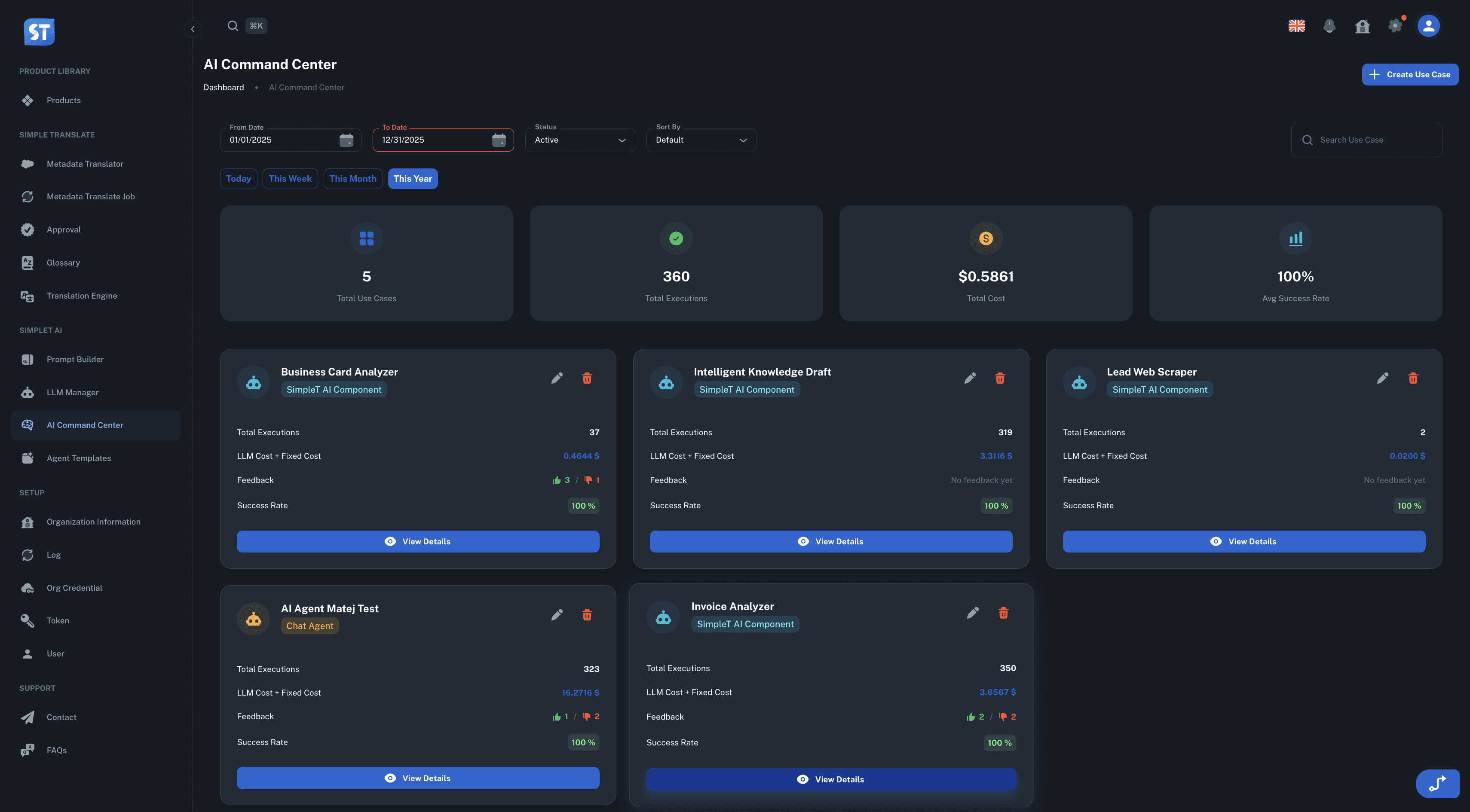
Optimize your prompt-based AI operations with comprehensive performance tracking and cost monitoring. SimpleT AI Components tracking in Salesforce AI Command Center helps businesses manage content generation, ticket classification, and automated processing with real-time analytics and execution insights.
Step 1: Create Your AI Component Use Case
Select "SimpleT AI Component" from use case types
Configure component name and description for easy identification (e.g., "Sales Email Generator AI")
Connect existing Prompt Builders for automated performance tracking
Set fixed cost parameters to include operational expenses beyond LLM token costs
Step 2: Monitor Real-Time AI Performance Metrics
Your component dashboard displays critical KPIs:
Total Executions: Complete usage analytics across all team members
AI Success Rate: Automated calculation from execution success data
Cost Analysis: Combined LLM costs + operational fixed expenses
User Satisfaction: Real-time feedback tracking and user ratings
Step 3: Debug and Optimize Performance (~5 minutes)
Click "Debug" button to examine individual AI executions in detail
Review execution logs to identify performance patterns and optimization opportunities
Analyze token usage efficiency and cost-per-operation metrics
Monitor user feedback trends to improve AI response quality
Use filtering and search capabilities to troubleshoot specific issues
Advanced Execution Log Analytics for AI Optimization
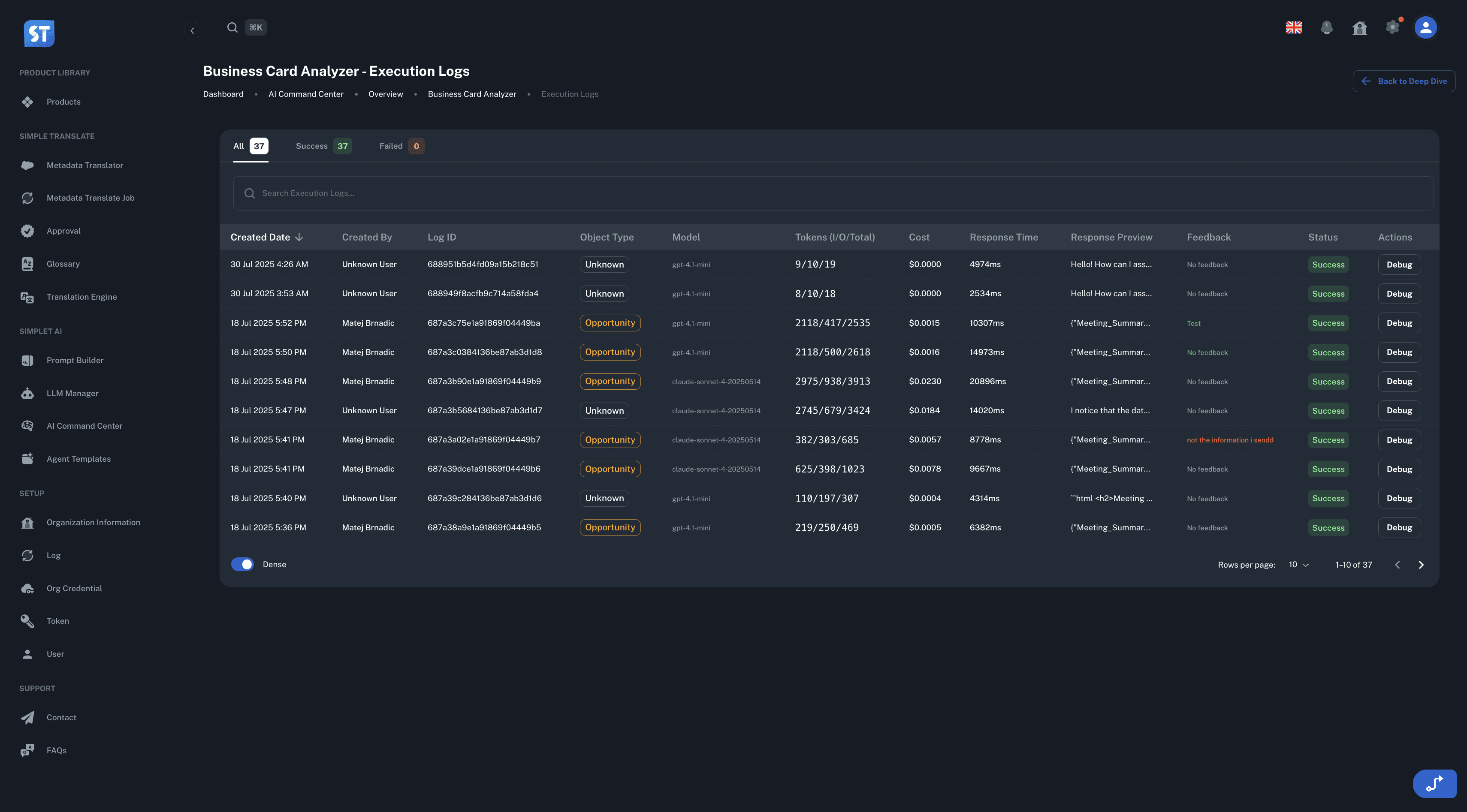
Access comprehensive execution data for performance optimization and troubleshooting with smart filtering and search capabilities that provide deep insights into your AI operations.
Smart Filtering and Search Capabilities
Date range analytics for trend analysis and reporting
Team usage insights by filtering data by specific team members
Status-based filtering for success/failure pattern analysis
Advanced search across execution histories
Detailed AI Performance Data Points
Every execution log captures comprehensive performance metrics:
Input/Output Analysis: Complete request and response logs for troubleshooting
Token Efficiency Metrics: Track input, output, and total tokens for cost optimization
Response Time Monitoring: Processing time data for performance benchmarking
User Feedback Intelligence: Detailed user comments and satisfaction ratings
Salesforce Integration: Connected records and business context from your CRM
Debug and Testing Capabilities
The built-in debugging tools provide comprehensive testing and troubleshooting capabilities:
One-Click Debug Access: Click the "Debug" button on any component to examine detailed execution data
Error Analysis: Detailed error messages and failure reasons for quick troubleshooting
Performance Benchmarking: Compare response times and success rates across different time periods
User Journey Tracking: Follow individual user interactions to identify improvement opportunities
Best Practices: AI Component Use Cases for Business Growth
Learn how successful organizations implement AI Component tracking to drive business value and optimize their AI investments across different operational scenarios.
Content Marketing AI Automation
Set up dedicated components for email marketing, social media posts, and blog content generation. Compare token efficiency across content types, track user approval rates, and optimize cost-per-piece production metrics through comprehensive execution analytics.
Customer Support Automation
Deploy ticket classification components to monitor accuracy through execution status tracking. Measure automation ROI using response_time_ms compared to manual processing workflows. Analyze user feedback patterns for continuous improvement of classification algorithms.
Sales Process Optimization
Implement lead qualification AI components to track conversion success rates and cost-per-qualified-lead metrics. Use execution log analysis to refine prompts based on real user feedback and performance data, ensuring optimal lead processing efficiency.
Advanced Deduplication Technology
The AI Command Center's built-in deduplication algorithms ensure accurate metrics across multiple data sources, providing reliable business intelligence for your AI investment decisions and performance optimization strategies.
Transform Your AI Component Performance Today
Stop guessing about your AI performance and start making data-driven optimization decisions. SimpleT AI Components tracking provides the comprehensive visibility and analytics your organization needs to maximize AI ROI while maintaining operational excellence.
Whether you're managing a single content generation component or dozens of automated processing workflows, the unified tracking system scales with your needs while providing the granular insights that separate successful AI implementations from costly experiments.
Start Optimizing Your AI Components Today
Ready to transform your AI component performance tracking? The comprehensive analytics and execution insights provide everything you need to optimize costs, improve success rates, and maximize user satisfaction.
For technical implementation details and configuration options, visit our SimpleT Documentation.
Published:
8/6/2025
Back to the Articles List